


AARP SafeTrip™
4.3142.00 Reviews
App Specs
- Version
- aarp-v4.0.0.0-95522-g164d726-prod
- Updated On
- License
- Free
- Downloads
- 100,000+
- Developer
- AARP
- Categories
- Auto & Vehicles
- Platform
- Android, iOS
Screenshots
 Analysis by AppCompare
I like to think about driving apps in terms of what happens before, during, and after a journey. A route tool can look polished on a screen, but it only helps if it fits the way I actually plan a trip and if its prompts arrive at useful moments. AARP SafeTrip™ is aimed at drivers who want support for safer habits, and I’d judge it less as a replacement for every map app and more as a companion whose value depends on how you use it.
Choose the job before you set off
Before relying on any driving app, I decide what I need it to do. If I’m unfamiliar with an area, I want dependable turn-by-turn directions. If I know the route already, I may care more about staying attentive and getting a clearer picture of my driving. Those are related needs, but they aren’t interchangeable. SafeTrip makes the most sense when safer driving is the priority rather than simply finding the shortest way across town.
AARP is the developer, and the app sits in the auto-and-vehicles category. It is free, has an Everyone age rating, and has attracted over one hundred thousand installs. Its average rating is 4.3 from around 360 ratings, with roughly 130 written reviews. Those figures suggest a real audience, but they don’t tell me whether its particular approach suits my routine; the useful test is whether it fits the trips I make and the attention I want to give an app.
A practical routine from planning to parking
My sensible workflow starts while the car is parked: open the app, complete the setup, and check that the options I want are ready before moving. That small habit matters with any driving tool. Trying to sort out settings at a junction or while pulling away adds distraction at exactly the wrong time. I’d also make sure the phone has enough charge for the outing and is placed where I won’t be tempted to pick it up.
On an ordinary drive, I’d let the app do its work in the background and treat any prompt as something to respond to safely, not as a reason to stare at the screen. A useful alert should help me make a decision early; it shouldn’t compete with road signs, mirrors, passengers, or the traffic around me. If I’m already using a separate navigation app, I’d decide in advance which one is responsible for directions so two sets of instructions don’t become a distraction.
Picture a familiar weekday trip that suddenly slows down near a busy junction. A navigation app may be the better tool if I need an alternate route immediately. SafeTrip is more relevant if my bigger aim is to stay aware of my driving and avoid letting routine familiarity turn into inattention. After parking, I can take a moment to think about whether the app’s prompts were useful and whether I would change how I set up the next drive. The point is to make the journey calmer, not to turn every commute into a screen-checking exercise.
Where it fits alongside other driving tools
Most people already have access to maps or navigation on a phone, and those tools are often the straightforward choice for finding an address, comparing routes, or getting directions in an unfamiliar place. A driving-safety app has a different job. I wouldn’t assume one replaces the other: I’d use navigation when getting from A to B is the main challenge, and consider SafeTrip when building more attentive habits is the focus. That distinction is especially useful for people who already know their regular routes.
Worth Reading Before You Choose

EA SPORTS FC Mobile 26 Is a Bigger Football Game, but It Takes Time

Flipboard Shows What News Apps Must Do Beyond the Feed

Switching to Android Auto Means Rethinking Your Driving Routine

Google Calendar Makes a Crowded Week Easier to Manage

Ludo King Makes the Most of the Minutes Between Plans

Baby Panda World Brings Quick Play to Modern Phones, but Its Game Library Feels Busy
There is a trade-off in running more than one app. Switching between screens, hearing overlapping voice prompts, or granting location access to multiple tools can make a simple drive feel complicated. I’d keep the setup minimal, test the arrangement while parked, and avoid adding a second app unless it contributes something I genuinely want. If one app already handles the trip clearly and safely, adding another may not improve the experience.
SafeTrip may suit someone who drives often, wants a dedicated nudge toward safer habits, and is comfortable using a phone-based tool as part of a parked-before-driving routine. It is less compelling for a person who only needs occasional directions, dislikes notifications, or expects a navigation app to solve every route-planning problem. If you’re a passenger helping the driver plan, you can also do the searching and setup while the vehicle is stopped; the driver should not be managing the phone in motion.
Small decisions that make the experience better
One practical tip is to decide what counts as a helpful prompt before a trip. If an alert is important, the driver should be able to receive it without reading the display; if it requires attention, wait until the car is safely parked. That boundary is easy to overlook when a phone is familiar, but it keeps the app in its proper role: support for the driver, not a substitute for paying attention.
I’d also try it first on a short, familiar journey rather than making its first outing a long drive in an unfamiliar area. That gives me room to understand how it fits into my routine without simultaneously navigating new roads. A second useful check is whether the phone placement and audio setup are comfortable before leaving. The best configuration is the one that lets me keep my eyes on the road and my hands available for driving.
Location-based driving tools can be less convenient when a phone is low on power, its connection is unreliable, or the driver would rather not use location services. I’d plan around those everyday constraints instead of assuming an app will be available in every situation. For a longer trip, I still want a separate plan for directions and important stops, and I wouldn’t rely on any app as my only source of road information.
Getting Started with AARP SafeTrip™
First off, downloading AARP SafeTrip™ was a breeze. Whether you're an Android or iOS user, you can find it easily on the app stores. Once installed, setting it up is pretty straightforward. The app welcomes you with a simple interface that's easy on the eyes, which is always a plus when you're dealing with tech that you need to check quickly.
The app walks you through the initial setup, asking for permissions that are essential for its full functionality. Don't worry, it's mostly about accessing location services and sending notifications. After all, you want it to keep you updated on road conditions and alerts, right?
Features That Stand Out
This app is like having a co-pilot who doesn’t mind doing all the boring stuff. Let’s break down some of its most useful features:
- Real-Time Traffic Alerts: The app provides live updates on traffic conditions, helping you avoid those dreaded jams. It’s like having a traffic helicopter on your phone.
- Route Optimization: It’s not just about avoiding traffic; it’s about finding the most efficient routes. The app recalibrates your path based on current road conditions, which can save you both time and gas money.
- Safety Alerts: Get notifications about potential hazards like sharp turns or speed traps. It’s like your mom warning you to slow down, but cooler.
These features are great if you’re a frequent driver or just someone who wants to make the most out of their trip without unnecessary hassle.
User Experience and Interface
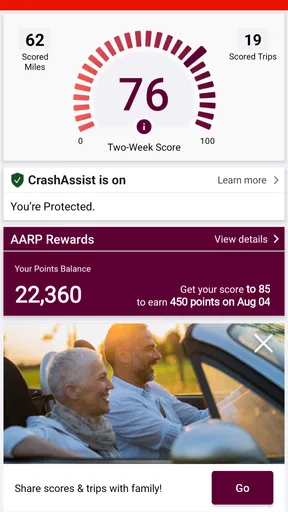
The app’s interface is clean and intuitive. The home screen displays your essential information, such as your current location, estimated time of arrival, and any active alerts. It’s not cluttered, which means you can find what you need without getting distracted. The app's design deserves a thumbs up for keeping things simple yet effective.
One thing I particularly liked is the voice guidance option. Sure, most navigation apps have it, but AARP SafeTrip™ feels a bit more conversational. It’s almost like having a chat with a friend who’s guiding you along the way. You can also customize the voice settings, which is a nice touch.
Compatibility and Performance
I tested the app on both Android and iOS devices, and I didn’t encounter any hiccups. It runs smoothly, doesn’t lag, and doesn’t drain your battery excessively, which is critical for an app you’ll be using on the go. The developers clearly did their homework in optimizing the app for different devices.
Another cool aspect is the app’s ability to integrate with your car’s Bluetooth system. It syncs up nicely, letting you keep your focus on the road without constantly looking at your phone.
What to expect from the setup and day-to-day use
Setup is only useful if it leaves the driver with less to manage once the car is moving. I’d take a minute to review the permission prompts rather than tapping through automatically, then decide whether location access and notifications match how I plan to use the app. If I change my mind later, I can review the phone’s settings while parked. That is a more comfortable way to handle privacy choices than making them in the middle of a trip.
For someone who shares a car with family, it’s worth agreeing on a simple handoff: the person driving handles the road, while a passenger can help with preparation or check information when stopped. That keeps the phone from becoming a shared distraction. On solo drives, voice guidance and a stable phone position matter more than frequent glances at a map. I would not treat a notification as permission to interact with the screen while moving.
The app’s current version is aarp-v4.0.0.0-95522-g164d726-prod, and it runs on Android 10 or later. That gives Android users a practical compatibility check before downloading. The app is also available for iOS, so people using different phones can consider it, though I’d still make sure each device is ready before relying on it for a particular trip.
One question drivers often have is whether they need to be an AARP member. I’d check the app’s own setup and current store details if membership eligibility matters to you, rather than assuming that the developer’s name alone settles it. Another is whether it can replace a familiar map app. I would not make that assumption: use it for the driving support it offers, and keep a dedicated navigation option available when you need detailed directions or route planning.
When a different choice makes more sense
For a new city, a complicated series of stops, or a route where turn-by-turn guidance is the main need, I’d start with a navigation app I already trust and understand. For a quick local errand, I might not need a second driving tool at all. SafeTrip is a better fit when I want a purposeful safety companion in my routine, not simply another map to consult.
It may also be the wrong choice for someone who finds spoken prompts distracting or prefers not to have a phone-based service involved in driving. In that case, a simpler setup—clear directions prepared before departure, the phone put away, and attention on the road—can be more suitable. No app can compensate for fatigue, poor judgement, or unsafe driving, and alerts should never be treated as a guarantee that a hazard has been identified.
For a regular commute, I’d judge the app by whether it helps me drive with more intention without adding chores. If it creates extra screen checks or competes with another tool, I’d simplify the setup or leave it out of that trip. If it quietly supports a safer routine, it has a clearer reason to stay installed. The difference comes down to fit, not the number of features on a screen.
Is AARP SafeTrip™ Worth It?
In my opinion, if you’re someone who values safety and efficiency while driving, AARP SafeTrip™ is a solid addition to your smartphone toolkit. It’s user-friendly, efficient, and packed with features that make driving safer and less stressful. Plus, it’s continually updated to ensure you're getting the best possible service.
Whether you're commuting to work or embarking on a cross-country road trip, this app is like having an extra set of eyes on the road. And honestly, who wouldn't want that? It’s a small download for a big peace of mind.
My recommendation is to try it on a familiar trip first and see whether its support feels useful without pulling your attention away. If you’re looking primarily for directions, stick with a navigation tool built around that job; if safer driving habits are what you want to encourage, this app is worth considering. It’s free to download, and its 4.0.0.0-series release is the version I’d check for on a compatible device.
Pros
- User-friendly interface for easy navigation.
- Real-time alerts for safer driving.
- Customizable settings for personalized use.
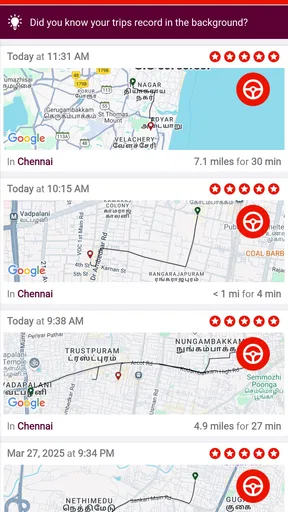
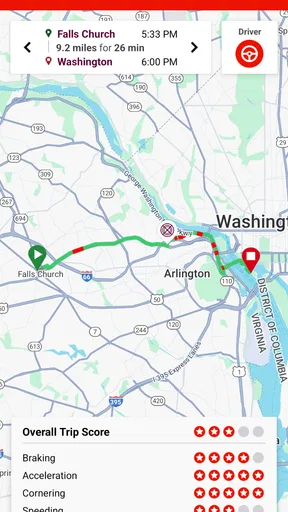
- Detailed trip reports and insights.
- Battery-efficient with minimal drain.
Cons
- Requires location access at all times.
- Limited features in the free version.
- May not be compatible with older devices.
- Occasional glitches in alert notifications.
- Subscription needed for premium features.
FAQs for AARP SafeTrip™
What is AARP SafeTrip™ and what does it offer?
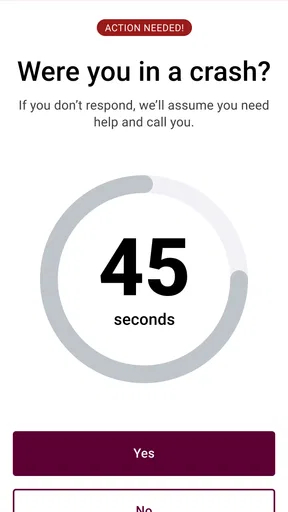
AARP SafeTrip™ is an app designed to enhance your travel safety and provide peace of mind while on the road. It offers features like real-time traffic updates, route planning, and emergency assistance services. The app also includes location sharing, which allows you to keep loved ones informed of your whereabouts. Additionally, AARP members can enjoy exclusive benefits, making it a comprehensive tool for safer travels.
Is AARP SafeTrip™ compatible with both Android and iOS devices?
Yes, AARP SafeTrip™ is available for both Android and iOS devices. You can download it from the Google Play Store for Android devices or the Apple App Store for iOS devices. The app is designed to work seamlessly on most smartphones and tablets, offering a user-friendly interface and efficient performance regardless of your device's operating system.
How does AARP SafeTrip™ ensure user privacy and data security?
AARP SafeTrip™ prioritizes user privacy and data security by implementing robust encryption protocols and strict privacy policies. The app only collects necessary data to provide its services and does not share personal information with third parties without user consent. Users can control their privacy settings, including location sharing, to ensure their data is protected while using the app.
Are there any costs associated with using AARP SafeTrip™?
While AARP SafeTrip™ offers free basic features, some premium features may require a subscription or a one-time purchase. AARP members often receive discounts or free access to premium features. It's recommended to check the app's pricing details on the relevant app store or the AARP website to understand any costs before downloading.
What should I do if I encounter issues or need support while using AARP SafeTrip™?
If you experience any issues or need assistance with AARP SafeTrip™, you can access the in-app support feature to contact customer service. Additionally, the AARP website provides a comprehensive help section, including FAQs and troubleshooting guides. For urgent issues, you can also reach out to their customer support via phone or email to receive prompt assistance.


